BBy Bikram Nath·Researched from UK Amazon listings·Updated 2026-07-10·6 products compared
What are the best wireless keyboards to buy in the UK?
Our top pick for Wireless Keyboards in the UK is the UGREEN Wireless Keyboard — Bluetooth 5.4 + 2.4GHz, UK Layout, 3 Devices, Rechargeable.
For UK home office workers who need a keyboard that switches cleanly between multiple devices, the UGREEN Bluetooth 5.4 + 2.4GHz keyboard is the buy — it connects to up to three devices simultaneously and the UK QWERTY layout is critical for British users who type currency symbols and inverted commas daily.
Disclosure: As an Amazon Associate I earn from qualifying purchases. This guide contains Amazon affiliate links, and we may earn a commission — at no extra cost to you — but it never changes our rankings.
A good wireless keyboard declutters your desk and lets you type from anywhere in the room — essential for UK home office setups where space is often limited. The most important thing for UK buyers is confirming a genuine UK QWERTY layout: the British keyboard has a tall double-height Enter key, a shorter left Shift, and the correct placement of the £ symbol on the 3 key, the @ on the 2 key, and the " above the apostrophe. Many cheaper keyboards default to US ANSI layout, which causes constant frustration for UK typists. The second key consideration is multi-device connectivity — whether you want to switch between a laptop, tablet, and phone without re-pairing each time. Modern wireless keyboards offer Bluetooth 5.0–5.4 for up to three simultaneous device pairings, and some add a 2.4 GHz USB receiver for plug-and-play use on devices without Bluetooth. All keyboards here are confirmed UK layout and available on Amazon UK.
Buying guide
What should you look for in Wireless Keyboards?
1UK layout: Always verify 'UK QWERTY', 'UK Layout', or 'QWERTY UK' in the product title or specs. The UK layout has a tall Enter key, £ on the 3 key, and @ on the 2 key — all wrong on a US ANSI layout.
2Multi-device: Keyboards that connect to 3 devices simultaneously let you switch between a work laptop, personal MacBook, and iPad with one keystroke — far more convenient than re-pairing.
3Battery type: Rechargeable keyboards (USB-C) need charging every 2–3 months; AAA battery keyboards last 12–18 months per set without the hassle of charging. Both have trade-offs.
4Noise: Scissor-switch keyboards are significantly quieter than mechanical keyboards — better for shared UK home offices, flat walls, or late-night typing.
52.4 GHz vs Bluetooth: Bluetooth saves a USB port; a 2.4 GHz nano USB receiver has slightly lower latency and works on any device including those without Bluetooth (older desktop PCs, Smart TVs).
Our process
How do we choose our picks?
We don’t lab-test products ourselves. Instead we synthesise the strongest independent evidence — current Amazon UK listings, verified-buyer feedback, published specs and UK pricing — into clear, honest recommendations. We earn a commission if you buy through our links, but that never changes which products we rank.
Current UK availability
We only shortlist products actively listed and in stock on Amazon UK, checked against live catalogue data — not last year’s models.
Publicly visible buyer feedback
We look at how each product is received by UK shoppers — its overall rating standing and the praise or complaints that recur in public reviews — rather than relying on a single reviewer’s opinion.
Published specs & value
We compare manufacturer specifications, typical UK price bands, warranty and running costs so each pick is right for a real budget and use-case.
UK-specific fit
We factor in UK voltage, plug/fitting standards, CE/UKCA marking and Consumer Rights Act cover — details that generic global lists miss.
UGREEN Wireless Keyboard — Bluetooth 5.4 + 2.4GHz, UK Layout, 3 Devices, Rechargeable
The UGREEN wireless keyboard is the best-balanced option on this list. Bluetooth 5.4 plus a 2.4GHz receiver covers every device scenario, the UK layout is confirmed, and the 90-day rechargeable battery eliminates the need to buy AAA batteries. Solid choice for UK home office workers juggling multiple devices.
Layout
UK QWERTY
Connectivity
Bluetooth 5.4 + 2.4GHz USB receiver (dual mode)
Devices
3 simultaneous
Battery
Rechargeable, 2-hour charge, 90 days use
Dimensions
36.5 cm x 12.3 cm x 2.07 cm
Os
Windows, macOS, iPadOS, Linux, Chrome OS, Android
What we like
+Dual-mode (Bluetooth 5.4 and 2.4GHz) — works with devices both with and without Bluetooth
+UK layout confirmed — correct £, @, and Enter key shape
+90-day battery on a single 2-hour charge — minimal charging needed
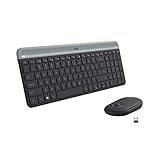
The Logitech MK470 is the premium pick for UK buyers who want a trusted brand, confirmed UK layout, and a keyboard-and-mouse bundle in one. Logitech keyboards are a fixture in UK offices and have an excellent track record for durability. The 2.4GHz-only connection means you'll use one USB port, but latency is consistently low.
Layout
UK QWERTY
Connectivity
2.4GHz USB receiver (Unifying)
Included
Keyboard + mouse
Brand Reliability
Logitech — industry-leading keyboard brand
What we like
+Logitech brand — industry-leading reliability and UK after-sales support
+UK QWERTY confirmed — correct layout out of the box
+Keyboard and mouse combo — no separate mouse purchase needed
+Slim profile with quiet scissor-switch keys
Worth noting
–2.4GHz only — no Bluetooth, requires a USB port for the receiver
–No multi-device switching — single device connection only
£33.99£44.99−24%Amazon.co.uk price as of 19 Sept, 13:00 (London time). Details
TECKNET 4-Mode Wireless Keyboard — 3x Bluetooth 5.0 + 2.4GHz, UK Layout, Rechargeable
The TECKNET 4-mode keyboard offers the widest device connectivity on this list — four simultaneous connections covering three Bluetooth and one 2.4GHz device. The 180-day rechargeable battery and 36-month warranty make it exceptional value. Best for UK multi-device users who switch between desktop, laptop, tablet, and phone.
Layout
UK QWERTY
Connectivity
3x Bluetooth 5.0 + 2.4GHz USB (4 devices total)
Battery
500 mAh rechargeable, 180 days use (2h/day)
Shortcut Keys
14
Switch Type
Scissor, 90% quieter than standard
Anti Slip
5 anti-slip pads
Warranty
36 months (registration required)
What we like
+Connects to 4 devices simultaneously — unique on this list
+180-day battery life from a 2-hour charge — exceptional longevity
+90% noise reduction vs. standard keyboards — ideal for shared spaces
+36-month warranty with registration
Worth noting
–Compatible with most devices but explicitly notes incompatibility with iPhones via USB
–Silver colourway only — limited aesthetic choice
£16.99£22.99−26%Amazon.co.uk price as of 19 Sept, 13:00 (London time). Details
Inateck Bluetooth Keyboard — 3 Devices, UK Layout, 217g, 18-Month Battery, Gray
The Inateck gray keyboard is the best pick for UK travellers. At 217g and 285mm wide it fits in a jacket pocket, and the 18-month AAA battery means no charging cable needed on trips. The three-device Bluetooth switching with visual indicators makes it easy to manage a laptop, tablet, and phone while away from home.
Layout
UK Layout
Connectivity
Bluetooth 5.3 (3 devices)
Battery
AAA x2, up to 18 months
Weight
217g
Width
285mm
Os
Windows, iPadOS, Android, macOS, Fire OS
What we like
+18-month AAA battery life — no charging required, just swap batteries when needed
+217g and 285mm wide — genuinely pocketable for travel
+Bluetooth indicator lights (blue/orange/green) show which device is active
+Works with Amazon Fire OS — covers Kindle Fire tablets popular in UK
Worth noting
–AAA batteries not included
–No 2.4GHz mode — Bluetooth only
£11.94£16.99−30%Amazon.co.uk price as of 19 Sept, 13:00 (London time). Details
Inateck Bluetooth Keyboard — 3 Devices, UK Layout, 217g, 18-Month Battery, White
The white Inateck is the same excellent travel keyboard as rank 4, in a clean white colourway that suits MacBook and iPad aesthetics. Choose white if you have a light-coloured desk setup; otherwise the gray version is marginally more practical for hiding everyday marks.
Layout
UK Layout
Connectivity
Bluetooth 5.3 (3 devices)
Battery
AAA x2, up to 18 months
Weight
217g (630g including packaging)
Os
Windows, iPadOS, Android, macOS, Fire OS
Colour
White
What we like
+White colourway — cleaner desk aesthetic, pairs well with MacBook Air/iPad
+Same 18-month AAA battery and 217g weight as the gray variant
+15x15mm keycap size with 1.5mm key travel — comfortable for touch typists
+Dedicated extra Bluetooth pairing button on base
Worth noting
–White shows dirt more easily over time
–Bluetooth only — no 2.4GHz fallback
£11.94£14.99−20%Amazon.co.uk price as of 19 Sept, 13:00 (London time). Details
TECKNET 2.4G Wireless Compact Mini Keyboard — UK Layout, 0.4cm Slim, 296g
The TECKNET mini is the cheapest wireless UK keyboard on this list that still has confirmed UK layout, a 15-metre range, and a 36-month warranty. The 2.4GHz receiver and plug-and-play setup make it ideal for connecting to a Smart TV, desktop PC, or media centre without dealing with Bluetooth pairing. Simple, reliable, and inexpensive.
Layout
UK Layout
Connectivity
2.4GHz nano USB receiver
Battery
2x AAA (up to 12 months)
Thickness
0.4 cm
Weight
296g
Range
15m
Shortcut Keys
14
Warranty
36 months (registration required)
What we like
+0.4cm thin — slimmest keyboard on this list
+15m wireless range — works across a large room or from a sofa to a Smart TV
+Plug-and-play nano USB receiver — no drivers or software needed
+36-month warranty at the lowest price here
Worth noting
–2.4GHz only — uses a USB port; no Bluetooth
–AAA batteries not included; no rechargeable option
£12.99£14.99−13%Amazon.co.uk price as of 19 Sept, 13:00 (London time). Details
Product prices and availability are accurate as of 19 Sept, 13:00 (London time) and are subject to change. Any price and availability information displayed on Amazon.co.uk at the time of purchase will apply to the purchase of this product.
Editor's Note
The single most common mistake UK buyers make when purchasing wireless keyboards online is overlooking layout. A US ANSI keyboard paired with a UK Windows installation causes incorrect output for the @, ", £, #, and ~ keys — frustrating for daily typing. Always check that the product listing explicitly states 'UK QWERTY', 'UK Layout', or 'ISO-UK'. All six keyboards on this list are confirmed UK layout. For iPad users specifically: Inateck advises setting the hardware keyboard language to 'British-PC' in iPad Settings for correct key mapping — an important setup step that many UK users miss. Under the UK Consumer Rights Act 2015, wireless keyboards that develop a fault within 6 months are presumed defective at manufacture — Amazon UK will replace or refund without the buyer needing to prove the fault existed at purchase. Rechargeable keyboards (USB-C) are more environmentally friendly and cost less over time than those requiring disposable AAA batteries.
Our Take
The UK electronics market moves fast — what was the best buy six months ago may not be today. The UGREEN Wireless Keyboard — Bluetooth 5.4 + 2.4GHz, UK Layout, 3 Devices, Rechargeable is our top recommendation. If that's out of budget, the TECKNET 4-Mode Wireless Keyboard — 3x Bluetooth 5.0 + 2.4GHz, UK Layout, Rechargeable offers solid performance at a lower price point. The Logitech MK470 Slim Wireless Keyboard & Mouse Combo — UK QWERTY is worth considering if you want a step up in build quality or features. Avoid the cheapest unbranded options on Amazon UK — they rarely survive past six months of regular use and UK consumer protection only helps if the seller is still trading.
Questions & answers
Frequently asked questions
How do I make sure a wireless keyboard has UK layout?
Look for 'UK QWERTY', 'UK Layout', 'ISO-UK', or 'QWERTY UK' explicitly stated in the product title or specifications. The UK layout has a tall two-row Enter key, a shorter left Shift key, and the £ symbol on the 3 key. If the listing only says 'QWERTY' without specifying UK or US, assume it is US ANSI layout and avoid it.
Is Bluetooth or 2.4GHz wireless better for a keyboard?
Bluetooth saves a USB port and lets you connect to up to 3 devices simultaneously — ideal for multi-device setups. A 2.4GHz nano USB receiver has slightly lower and more consistent latency, works with devices that lack Bluetooth (older PCs, Smart TVs), and has zero pairing setup. For most UK home office users, Bluetooth is the better long-term choice; 2.4GHz suits Smart TV and desktop PC users.
How long do wireless keyboard batteries last?
Rechargeable keyboards (like the UGREEN and TECKNET 4-mode) last 90–180 days per charge with typical use of 2 hours daily. AAA battery keyboards (like the Inateck models) last 12–18 months per set of batteries. Both are practical; rechargeable is more eco-friendly and cheaper over time, while AAA keyboards never need a charging cable on trips.
Affiliate disclosure: As an Amazon Associate I earn from qualifying purchases. UKPicks earns a small commission from qualifying purchases made via links on this page. This does not affect our editorial recommendations or the price you pay.