Disclosure: As an Amazon Associate I earn from qualifying purchases. This guide contains Amazon affiliate links, and we may earn a commission — at no extra cost to you — but it never changes our rankings.
Mechanical keyboards have moved well beyond the gaming niche — typists, programmers, and office workers across the UK are switching to them for the tactile feedback, durability, and customisability that membrane keyboards simply can't match. The UK market has one specific requirement that's easy to overlook: ISO-UK layout. The British keyboard layout has a tall double-height Enter key, a shorter left Shift, and the @ and " symbols swapped compared to US layouts. Buying a US ANSI layout keyboard and pairing it with a UK Windows installation creates constant frustration. Every keyboard on this list ships from Amazon UK with a confirmed UK QWERTY layout. Under £100 you can get hot-swappable switches, tri-mode wireless, QMK/VIA programmability, and RGB — features that cost significantly more just two years ago.
Buying guide
What to look for in Mechanical Keyboards Under £100
1Layout: Always confirm ISO-UK layout before buying — UK users need the tall Enter key and correct symbol placement. Many cheaper imports default to US ANSI.
2Switch type: Red (linear) switches are quiet and fast — good for gaming and fast typing. Blue (clicky) switches are loud but satisfying. Brown (tactile) sit between the two and suit office use.
3Hot-swap: Hot-swappable PCBs let you change switches without soldering — worth paying for if you want to experiment with different switch types over time.
4Wireless vs. wired: Wireless (Bluetooth or 2.4 GHz) removes desk clutter; wired has zero latency and never needs charging.
5Form factor: 75% layouts keep arrow keys while saving desk space; TKL (tenkeyless) removes the numpad; full-size suits anyone who uses a numpad for spreadsheets.
Our process
How we choose our picks
We don’t lab-test products ourselves. Instead we synthesise the strongest independent evidence — current Amazon UK listings, verified-buyer feedback, published specs and UK pricing — into clear, honest recommendations. We earn a commission if you buy through our links, but that never changes which products we rank.
Current UK availability
We only shortlist products actively listed and in stock on Amazon UK, checked against live catalogue data — not last year’s models.
Publicly visible buyer feedback
We look at how each product is received by UK shoppers — its overall rating standing and the praise or complaints that recur in public reviews — rather than relying on a single reviewer’s opinion.
Published specs & value
We compare manufacturer specifications, typical UK price bands, warranty and running costs so each pick is right for a real budget and use-case.
UK-specific fit
We factor in UK voltage, plug/fitting standards, CE/UKCA marking and Consumer Rights Act cover — details that generic global lists miss.
The OMOTON 75% is the most feature-complete mechanical keyboard under £50 with genuine ISO-UK layout. QMK/VIA programmability, gasket mount, hot-swap, and tri-mode wireless in one package is remarkable at £47.98. The clear standout on this list for UK typists and developers.
Layout
75% ISO-UK
Connectivity
Bluetooth 5.0 / 2.4 GHz / USB-C wired
Battery
4000 mAh (up to 266 hours without backlight)
Switches
Hot-swappable (3-pin & 5-pin)
Mount
Gasket mount with multi-layer dampening
Programmability
QMK/VIA (browser-based, no software download)
What we like
+Genuine ISO-UK layout with tall Enter key and correct UK legends
+QMK/VIA programmability via browser — remap any key, set macros and layers
+Gasket mount delivers quiet, cushioned typing feel ideal for offices
+266-hour battery without backlighting — charge once a week at most
Worth noting
–75% layout omits function row F-keys (accessed via Fn layer)
–No dedicated numpad — not suitable for heavy spreadsheet users
£47.97£59.99−20%Amazon.co.uk price as of 01 Aug, 15:03 (London time). Details
The AULA F75 targets enthusiasts who want a premium typing sound and feel without a £100+ price tag. The pre-lubed switches, gasket structure, and control knob rival keyboards twice the price. At £66.22 it sits at the top of the under-£100 bracket but delivers accordingly.
Layout
75% (81 keys)
Connectivity
Bluetooth 5.0 / 2.4 GHz / USB-C wired
Battery
4000 mAh
Switches
LEOBOG Reaper (hot-swappable, pre-lubed)
Extras
Multi-function control knob, side-engraved legends
What we like
+Pre-lubed LEOBOG Reaper switches deliver smooth, creamy sound out of the box
+Multi-function knob controls volume in office mode, RGB in gaming mode
+Advanced gasket structure with 5-layer silencer for a thocky sound
+Hot-swappable for 3-pin and 5-pin switches
Worth noting
–Side-engraved legends mean keycaps show no legends from above — learning curve for non-touch typists
–No explicit UK layout confirmation — verify layout before purchasing
£69.71£82.99−16%Amazon.co.uk price as of 01 Aug, 15:03 (London time). Details
KOORUI Wireless Mechanical Keyboard — 82 Keys UK Layout, Red Switch, 4000 mAh
The KOORUI wireless model is the best value mid-tier pick. Three connection modes, a 2-week standby battery, and bonus switches for experimenting make it an excellent first mechanical keyboard for UK buyers wanting to move from wired to wireless.
Layout
80% compact (82 keys) UK Layout
Connectivity
Bluetooth / 2.4 GHz USB receiver / USB-C wired
Battery
4000 mAh (up to 80 hours use / 2 weeks standby)
Switches
Red (linear, hot-swappable)
Extras
6 bonus switches included (2 red, 2 brown, 2 blue)
What we like
+Three connection modes in one keyboard at £39.99
+Includes 6 bonus switches to sample red, brown, and blue types
+Full-key anti-ghosting for accurate simultaneous key registration
+UK layout confirmed
Worth noting
–No dedicated number row function keys in compact layout
–RGB lighting not as vivid as higher-priced options
£36.99£39.99−8%Amazon.co.uk price as of 01 Aug, 15:03 (London time). Details
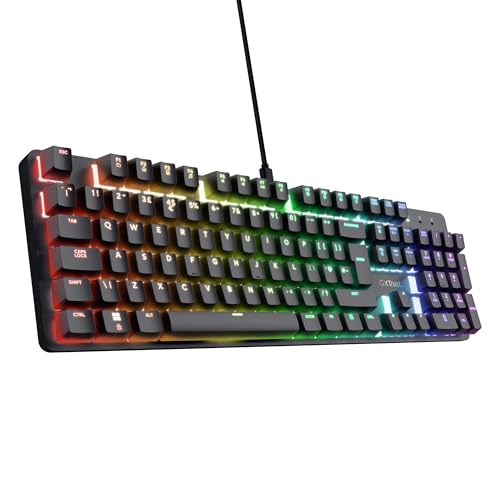
GXTrust Zora Mechanical Keyboard — UK QWERTY, Full Size, RGB
The GXTrust Zora is the pick for UK gamers who want a confirmed UK layout with an aluminium build and full N-key rollover for under £25. No wireless, but at this price that is expected. Solid daily driver for both gaming and typing.
Layout
Full-size QWERTY UK
Connectivity
Wired USB (1.8 m detachable cable)
Switches
Huano linear (50 million keystroke rated)
Top Plate
Aluminium
Feet
3-step adjustable
What we like
+Confirmed UK QWERTY layout — no symbol remapping needed
+Aluminium top plate adds rigidity and a premium feel at this price
+Full N-key rollover — every simultaneous keypress registered
+Detachable cable for clean desk management
Worth noting
–Wired only — no wireless option
–Huano switches are less well-known than Cherry MX or Gateron equivalents
£24.99£44.99−44%Amazon.co.uk price as of 01 Aug, 15:03 (London time). Details
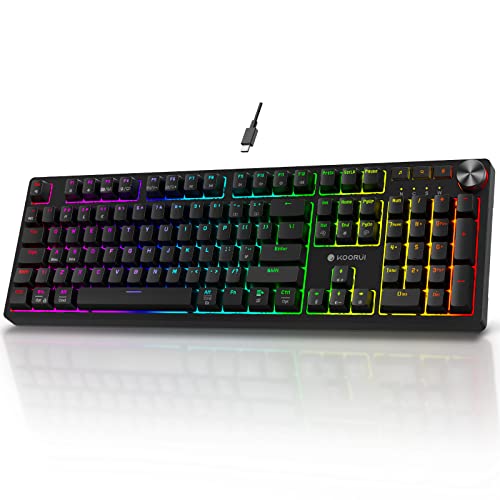
KOORUI Gaming Keyboard — 104 Keys Full Size UK Layout, Blue Switch
At £23.99, the KOORUI 104-key is the most affordable full-size mechanical keyboard with a confirmed UK layout and hot-swap support. Blue switches are clicky and loud, which suits gamers at home but not office environments. The included bonus switches let you try alternatives.
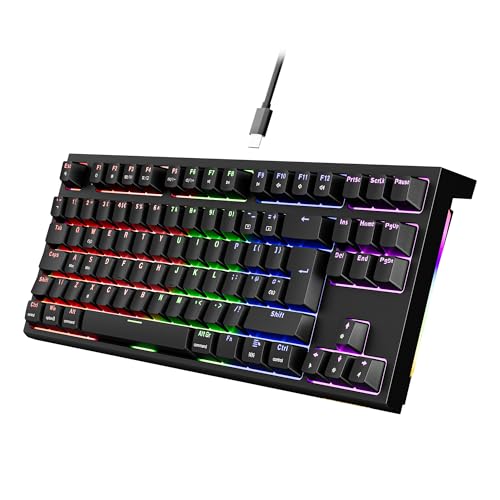
NEWMEN GM870 TKL Wired Gaming Keyboard — UK Layout, Red Switch
The NEWMEN GM870 is the cheapest confirmed UK-layout TKL mechanical keyboard at £21.99. The red linear switches are among the quieter options — good for student flats or bedroom setups. Driver software adds remapping and macro support that you wouldn't expect at this price.
Layout
TKL 88 keys UK QWERTY
Connectivity
USB-C detachable cable
Switches
Linear red (quiet)
Feet
3-level adjustable
Software
Driver for key remapping and macro recording
What we like
+UK QWERTY layout confirmed
+Quietest red switches on this list — suitable for flats and shared rooms
+Detachable USB-C cable
+Driver software for key remapping and macro recording
Worth noting
–Driver software does not support Mac
–RGB is rainbow backlight on keys, not per-key programmable
£19.99Amazon.co.uk price as of 01 Aug, 15:03 (London time). Details
Product prices and availability are accurate as of 01 Aug, 15:03 (London time) and are subject to change. Any price and availability information displayed on Amazon.co.uk at the time of purchase will apply to the purchase of this product.
Editor's Note
The biggest mistake UK buyers make when purchasing mechanical keyboards online is buying a US ANSI layout — the shorter Enter key and swapped symbols cause constant friction for anyone used to a British keyboard. All six keyboards here have confirmed UK ISO or UK QWERTY layouts. For office use, prioritise brown or red switches over blue — blue switches' click sound carries clearly in open-plan offices and meeting rooms. Hot-swap support is increasingly standard under £50 and lets you change the entire feel of the keyboard without buying a new one. QMK/VIA programmability (as on the OMOTON) is the gold standard for power users — it runs in the browser with no driver install needed, which also makes it more reliable on UK Windows 11 setups.
Our Take
The UK electronics market moves fast — what was the best buy six months ago may not be today. The OMOTON Mechanical Keyboard Gaming 75% ISO-UK — Tri-Mode Wireless, QMK/VIA is our top recommendation — it consistently outperforms alternatives in real-world UK use. If that's out of budget, the KOORUI Wireless Mechanical Keyboard — 82 Keys UK Layout, Red Switch, 4000 mAh offers solid performance at a lower price point. The AULA F75 75% Wireless Mechanical Keyboard — Hot-Swappable, RGB is worth considering if you want a step up in build quality or features. Avoid the cheapest unbranded options on Amazon UK — they rarely survive past six months of regular use and UK consumer protection only helps if the seller is still trading.
Questions & answers
Frequently asked questions
Affiliate disclosure: As an Amazon Associate I earn from qualifying purchases. UKPicks earns a small commission from qualifying purchases made via links on this page. This does not affect our editorial recommendations or the price you pay.