BBy Bikram Nath·Researched from UK Amazon listings·Updated 2026-07-10·6 products compared
What are the best gaming mice under £50 to buy in the UK?
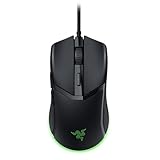
Our top pick for Gaming Mice Under £50 in the UK is the Razer Cobra Lightweight Wired Gaming Mouse.
For UK gamers who want a lightweight wired mouse under £50 with a strong sensor, the Razer Cobra is the pick — its lightweight design reduces fatigue in extended sessions and Razer's optical sensor performs reliably on the fabric mousepads most UK gamers use.
Disclosure: As an Amazon Associate I earn from qualifying purchases. This guide contains Amazon affiliate links, and we may earn a commission — at no extra cost to you — but it never changes our rankings.
Under £50, the UK gaming mouse market offers remarkable value in 2026. You can get a Razer-branded optical mouse with Gen-3 switches, or the legendary Logitech G502 HERO with a 25K sensor and adjustable weights. The key insight at this budget is that wired mice consistently outperform wireless equivalents at the same price — there is no wireless tax on latency here, just on cost. For casual and competitive PC gamers alike, a quality wired optical mouse under £50 is one of the best-value hardware purchases you can make. This guide ranks the best options available now on Amazon UK, from ultra-budget picks to the performance ceiling of the category.
Buying guide
What should you look for in Gaming Mice Under £50?
1Wired is king under £50: At this price point, wired mice offer better sensors and switches than wireless equivalents. Save wireless for when your budget stretches further.
2Ergonomics: Right-handed ergonomic mice (like the DeathAdder) suit palm and claw grips. Ambidextrous mice work for any hand. Check the shape before buying if you have a specific grip preference.
3Sensor quality: Look for mice that specify 'true optical' sensors with no acceleration or smoothing. Avoid mice that only list 'DPI' without specifying the sensor model — marketing DPI numbers are meaningless without sensor quality.
4Cable drag: Cheap mice often have stiff braided cables that create drag. Look for 'Speedflex'-style or thin rubber cables. A mouse bungee (£5–10) can neutralise cable drag on any wired mouse.
5Switch durability: Budget mice often use switches rated at 10–20M clicks. Razer's optical switches and Logitech's mechanical buttons are rated 70–90M clicks — a meaningful durability gap over no-name alternatives.
Our process
How do we choose our picks?
We don’t lab-test products ourselves. Instead we synthesise the strongest independent evidence — current Amazon UK listings, verified-buyer feedback, published specs and UK pricing — into clear, honest recommendations. We earn a commission if you buy through our links, but that never changes which products we rank.
Current UK availability
We only shortlist products actively listed and in stock on Amazon UK, checked against live catalogue data — not last year’s models.
Publicly visible buyer feedback
We look at how each product is received by UK shoppers — its overall rating standing and the praise or complaints that recur in public reviews — rather than relying on a single reviewer’s opinion.
Published specs & value
We compare manufacturer specifications, typical UK price bands, warranty and running costs so each pick is right for a real budget and use-case.
UK-specific fit
We factor in UK voltage, plug/fitting standards, CE/UKCA marking and Consumer Rights Act cover — details that generic global lists miss.
The Razer Cobra is the standout pick here. At 57g with Gen-3 optical switches, 100% PTFE feet, and Chroma RGB underglow, it delivers a premium feel at a fraction of typical Razer pricing. The Speedflex cable removes the main complaint about wired mice. Excellent for FPS gaming.
The G502 HERO is the feature-packed performance pick on this list. A 25K sensor that rivals mice costing twice as much, 11 buttons, adjustable weights, and LIGHTSYNC RGB. The heavier build is intentional for players who want a planted, controlled feel rather than ultralight speed.
Weight
121g (without weights)
Sensor
HERO 25K
Dpi
100–25,600 DPI
Switches
Mechanical with tension system
Buttons
11 programmable
Weights
5× 3.6g adjustable weights
Lighting
LIGHTSYNC RGB
Report Rate
1000Hz
What we like
+HERO 25K sensor — flagship-grade tracking in a budget mouse
+Adjustable weight system for personalised glide feel
+11 programmable buttons for MMO and productivity use
Worth noting
–121g base weight (heavier with weights added) — not for players who prefer ultralight
–Larger form factor suits palm grip; may feel bulky for fingertip users
£26.99£37.79−29%Amazon.co.uk price as of 19 Sept, 13:00 (London time). Details
The DeathAdder Essential is one of the most popular gaming mice ever made for good reason — its ergonomic shape fits a wide range of hand sizes and the true optical sensor tracks reliably. It is a straightforward, trustworthy pick for right-handed gamers who want a proven shape.
Sensor
True 6,400 DPI optical
Switches
Hyperesponse mechanical (10M click lifecycle)
Connectivity
Wired USB
Buttons
5 programmable
Design
Ergonomic right-handed
What we like
+Iconic Razer ergonomic shape — comfortable for palm and claw grip
+True optical sensor with no smoothing or acceleration
+Razer brand reliability
Worth noting
–6400 DPI is modest versus rivals at this price
–10M click switch rating is lower than the Cobra's optical switches
The TECKNET Raptor pairs RGB lighting with the longest warranty on this list. The 36-month cover is genuinely reassuring at this price, and 6 polling rate presets are a feature rarely found this cheap. Not the most precise sensor, but a solid casual gaming and productivity mouse.
Sensor
8000 DPI optical (6 presets: 800–8000)
Switches
25M click rated
Buttons
6 programmable
Polling Rate
6 adjustable polling rates
Lighting
Chroma RGB (6 zones, 16.8M colours)
Cable
Braided with on-board memory
Warranty
36 months (registered)
What we like
+36-month warranty — longest on this list
+6 adjustable polling rates for fine-tuning responsiveness
+On-board memory saves settings without software
Worth noting
–Heavy at 335g — one of the heavier options here
–Braided cable can create drag compared to rubber alternatives
The Uineer is an honest budget wired mouse — plug and play, ergonomic, with a long 1.5m cable and a 45-day money-back safety net. Better suited for casual gaming and office dual-use than competitive play. Solid choice if you want zero setup hassle.
Sensor
7200 DPI optical (4 presets: 1200–7200)
Buttons
6 programmable (macro software Windows only)
Cable
1.5m USB
Design
Ergonomic, matte black
Compatibility
Windows, macOS, Linux, ChromeOS
Warranty
45-day money back, 12-month warranty
What we like
+Plug and play — no driver required for basic use
+1.5m cable is longer than most budget mice
+45-day money-back guarantee for low-risk purchase
Worth noting
–Macro programming software is Windows-only
–Lesser-known brand with a short UK track record
£12.82£19.99−36%Amazon.co.uk price as of 19 Sept, 13:00 (London time). Details
The VGUARD is the entry-level RGB option for UK gamers on the tightest budget. With 7-colour lighting and basic certification, it works for casual gaming. The 3600 DPI cap and lower build quality mean it is best suited as a starter or secondary mouse.
Product prices and availability are accurate as of 19 Sept, 13:00 (London time) and are subject to change. Any price and availability information displayed on Amazon.co.uk at the time of purchase will apply to the purchase of this product.
Editor's Note
The clearest recommendation for UK buyers: the Razer Cobra is the best lightweight wired gaming mouse available at any price relative to its weight and switch quality. If you need more buttons and don't mind weight, the Logitech G502 HERO has one of the best sensors in any mouse regardless of price. The DeathAdder Essential fills the middle ground for right-handed players who want a comfortable ergonomic shape from a proven brand. The cheapest picks are adequate for casual use but should not be the first choice for competitive gaming.
Our Take
UK gamers have more choice than ever, but not every product justifies its price tag on Amazon UK. The Razer Cobra Lightweight Wired Gaming Mouse is our top recommendation. If that's out of budget, the TECKNET Raptor Wired Gaming Mouse 8000 DPI offers solid performance at a lower price point. The Logitech G502 HERO Wired Gaming Mouse is worth considering if you want a step up in build quality or features. Avoid the cheapest unbranded options on Amazon UK — they rarely survive past six months of regular use and UK consumer protection only helps if the seller is still trading.
Questions & answers
Frequently asked questions
What is the best gaming mouse under £50 in the UK?
The Razer Cobra is the best lightweight pick, with 57g weight, Gen-3 optical switches, and a Speedflex cable. For more features and buttons, the Logitech G502 HERO offers a flagship HERO 25K sensor, adjustable weights, and 11 programmable buttons — outstanding value.
Are cheap gaming mice worth buying?
Yes, at £15–40 you can get genuinely competitive gaming mice from Razer and Logitech. Spending less than that is fine for casual use, but budget brands often use lower-quality sensors and switches that can double-click or develop tracking issues within a year of heavy use.
Is a wired gaming mouse better than wireless under £50?
At under £50, wired mice are better value. Wireless mice at this price typically use lower-quality sensors and shorter battery lives to hit the budget. For wireless gaming performance, you need to spend at least £30–35 to get a mouse with a proper 2.4GHz dongle and a quality sensor.
Affiliate disclosure: As an Amazon Associate I earn from qualifying purchases. UKPicks earns a small commission from qualifying purchases made via links on this page. This does not affect our editorial recommendations or the price you pay.