BBy Bikram Nath·Researched from UK Amazon listings·Updated 2026-07-10·6 products compared
What are the best gaming monitors under £300 to buy in the UK?
Our top pick for Gaming Monitors Under £300 in the UK is the CRUA 27 Inch 280Hz Curved Gaming Monitor FHD.
For UK gamers who want the highest refresh rate available under £300, the CRUA 27 Inch 280Hz Curved FHD is the pick — 280Hz is more than enough for any competitive title and the curved panel reduces eye fatigue during long UK lockdown-style gaming marathons.
Disclosure: As an Amazon Associate I earn from qualifying purchases. This guide contains Amazon affiliate links, and we may earn a commission — at no extra cost to you — but it never changes our rankings.
The good news for UK gamers in 2026 is that you do not need to spend £300 to get a genuinely fast gaming monitor. The sub-£120 tier has become remarkably competitive, with 27-inch panels offering 180Hz–280Hz refresh rates and 1ms response times at prices that undercut what entry-level monitors cost just two years ago. The key decision at this budget is between flat IPS panels — which offer better colour accuracy and viewing angles — and curved VA panels — which give deeper contrast and a more immersive feel. Both are valid depending on whether you prioritise competitive gaming or immersive single-player experiences. This guide covers the best options currently available on Amazon UK, from trusted brands like LG and KOORUI to strong value picks from CRUA and Minifire.
Buying guide
What should you look for in Gaming Monitors Under £300?
1Curved vs flat: Curved monitors (typically 1800R or 1500R) wrap the image around your field of view, which feels more immersive but can distort straight lines in productivity tasks. Flat panels are better for content creation and multi-monitor setups.
2VA vs IPS at budget price: VA panels offer higher contrast (3000:1 vs 1000:1) for better dark scenes, but can suffer from smearing in fast motion. Fast IPS panels are sharper in motion but have lower contrast.
3HDMI vs DisplayPort: At 144Hz, HDMI 1.4 or 2.0 both work fine. To reach 165Hz–280Hz, you need DisplayPort — check the spec sheet for which ports support which refresh rates.
4Size matters at 1080p: On a 27-inch panel, 1080p gives you 81 PPI — noticeably less sharp than 1440p. Consider a 24-inch monitor if your GPU targets 1080p, as pixel density will be higher.
5Eye care features: Flicker-free and low-blue-light modes are standard on all monitors listed here — useful for long gaming or work sessions to reduce eye strain.
Our process
How do we choose our picks?
We don’t lab-test products ourselves. Instead we synthesise the strongest independent evidence — current Amazon UK listings, verified-buyer feedback, published specs and UK pricing — into clear, honest recommendations. We earn a commission if you buy through our links, but that never changes which products we rank.
Current UK availability
We only shortlist products actively listed and in stock on Amazon UK, checked against live catalogue data — not last year’s models.
Publicly visible buyer feedback
We look at how each product is received by UK shoppers — its overall rating standing and the praise or complaints that recur in public reviews — rather than relying on a single reviewer’s opinion.
Published specs & value
We compare manufacturer specifications, typical UK price bands, warranty and running costs so each pick is right for a real budget and use-case.
UK-specific fit
We factor in UK voltage, plug/fitting standards, CE/UKCA marking and Consumer Rights Act cover — details that generic global lists miss.
HDMI 1.4 (up to 144Hz), DisplayPort 1.2 (up to 200Hz)
1× HDMI, 1× VGA
HDMI 2.0, DisplayPort 1.2
HDMI, DisplayPort
The rankings
The best Gaming Monitors Under £300, ranked
1
CRUA
Top Pick
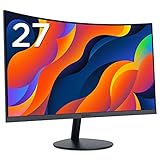
CRUA 27 Inch 280Hz Curved Gaming Monitor FHD
The CRUA 27-inch hits 280Hz — a refresh rate that was flagship territory two years ago. If you play competitive esports titles and want maximum frame rate on a budget, this is the standout choice. Use DisplayPort to unlock the full 280Hz.
Screen Size
27 inch
Resolution
1920×1080 (FHD)
Refresh Rate
280Hz
Response Time
1ms GtG
Panel Type
Curved (1800R)
Color Gamut
99% sRGB
Ports
HDMI (up to 120Hz), DisplayPort (up to 280Hz)
Mounting
VESA 100×100mm
What we like
+280Hz refresh rate for ultra-smooth esports gaming
+1800R curvature for an immersive wide field of view
+CRUA has 20+ years of monitor manufacturing experience
Worth noting
–HDMI limited to 120Hz — DisplayPort required for full 280Hz
LG's UltraGear 27GS60F is the safest pick on this list — a well-known brand, IPS panel quality, dual adaptive sync, and 180Hz. Ideal if you want brand assurance and easy UK warranty support.
Screen Size
27 inch
Resolution
1920×1080 (FHD)
Refresh Rate
180Hz
Response Time
1ms GtG
Panel Type
IPS
Hdr
HDR10
Color Gamut
99% sRGB
Adaptive Sync
G-Sync Compatible, FreeSync
What we like
+LG IPS panel with proven 99% sRGB and HDR10
+G-Sync Compatible and AMD FreeSync for tear-free gaming
+Reliable UK availability from a major brand
Worth noting
–1080p resolution is average for 27-inch panel size
CRUA's white curved monitor is a stylish option for light-themed setups. The 3000:1 contrast makes dark scenes look excellent, and 200Hz via DisplayPort is impressive at this price. A solid pick for single-player and immersive gaming.
Screen Size
27 inch
Resolution
1920×1080 (FHD)
Refresh Rate
200Hz (also supports 180/165/144Hz)
Response Time
1ms GtG
Panel Type
Curved (1800R)
Color Gamut
100% sRGB
Contrast
3000:1
Ports
HDMI 1.4 (up to 144Hz), DisplayPort 1.2 (up to 200Hz)
Mounting
VESA 100×100mm
What we like
+Available in white — rare at this price point
+3000:1 contrast ratio for deep blacks in dark games
+UK-based customer support
Worth noting
–HDMI 1.4 limits to 144Hz; DisplayPort needed for 200Hz
–VA panel has slower pixel response than IPS in fast scenes
The KOORUI 27N5CA is the entry point for UK gamers who want a 27-inch curved monitor. It covers 99% sRGB and has solid 144Hz performance. The lack of DisplayPort is a limitation for future-proofing.
Screen Size
27 inch
Resolution
1920×1080 (FHD)
Refresh Rate
144Hz
Panel Type
Curved VA
Color Gamut
99% sRGB
Viewing Angles
178°
Ports
1× HDMI, 1× VGA
Eye Care
Flicker-free, Low Blue Light
What we like
+178° wide viewing angles for a curved VA panel
+KOORUI is a well-established budget monitor brand in the UK
+Good entry price for a 27-inch curved display
Worth noting
–Only HDMI and VGA ports — no DisplayPort
–144Hz is the lowest refresh rate on this list
£84.99Amazon.co.uk price as of 19 Sept, 13:00 (London time). Details
The GEESUU 24-inch is the compact option for UK gamers with smaller desks or lower-power GPUs. Its 4000:1 contrast is exceptional for a budget panel, and 24 inches at 1080p means sharper pixel density. The 5ms response is the trade-off versus faster IPS options.
Screen Size
24 inch
Resolution
1920×1080 (FHD)
Refresh Rate
144Hz
Response Time
5ms
Panel Type
VA
Color Gamut
99% sRGB
Contrast
4000:1
Ports
HDMI 2.0, DisplayPort 1.2
Mounting
VESA 75×75mm
What we like
+4000:1 contrast ratio for exceptional dark scene depth
+24-inch size means sharper pixel density at 1080p
+HDMI 2.0 and DisplayPort for flexible connectivity
Worth noting
–5ms response time is higher than the 1ms rivals on this list
–No adaptive sync mentioned in specs
£69.99Amazon.co.uk price as of 19 Sept, 13:00 (London time). Details
Minifire 24 Inch 160Hz Curved Gaming Monitor 1500R
The Minifire 24-inch curved monitor is the cheapest entry on this list and still delivers 160Hz, 1ms response, and a vivid 130% sRGB colour gamut. A strong budget pick for UK gamers on the tightest budgets who still want a curved, fast panel.
Screen Size
24 inch
Resolution
1920×1080 (FHD)
Refresh Rate
160Hz
Response Time
1ms
Panel Type
Curved (1500R)
Color Gamut
130% sRGB
Ports
HDMI, DisplayPort
Adaptive Sync
Adaptive Sync
What we like
+130% sRGB for particularly vibrant colours
+1500R curve on a 24-inch panel is very immersive
Worth noting
–Lesser-known brand with a short UK track record
–24-inch size may feel small coming from larger displays
£89.99Amazon.co.uk price as of 19 Sept, 13:00 (London time). Details
Product prices and availability are accurate as of 19 Sept, 13:00 (London time) and are subject to change. Any price and availability information displayed on Amazon.co.uk at the time of purchase will apply to the purchase of this product.
Editor's Note
The budget UK gaming monitor market in 2026 is genuinely impressive value. The headline finding: 200Hz–280Hz panels are now available under £100. The practical advice — if you play esports titles (CS2, Valorant, Apex), prioritise refresh rate and go for the CRUA 280Hz. If you play story-driven games or RPGs, prioritise the LG IPS panel for colour accuracy. Always check which port achieves the advertised maximum refresh rate — several monitors here cap HDMI at 120Hz or 144Hz and require DisplayPort for the top speed.
Our Take
UK gamers have more choice than ever, but not every product justifies its price tag on Amazon UK. The CRUA 27 Inch 280Hz Curved Gaming Monitor FHD is our top recommendation. The LG UltraGear 27GS60F 27 Inch 1080p 180Hz IPS is worth considering if you want a step up in build quality or features. Avoid the cheapest unbranded options on Amazon UK — they rarely survive past six months of regular use and UK consumer protection only helps if the seller is still trading.
Questions & answers
Frequently asked questions
Is 144Hz good enough for gaming in 2026?
144Hz is still a strong baseline and feels significantly smoother than 60Hz. However, 165Hz–200Hz monitors are now available at similar prices, so it is worth stretching if your GPU can sustain high frame rates in your preferred games.
Should I get a curved or flat gaming monitor?
Curved monitors (1800R or 1500R) are better for immersive single-player and racing games. Flat monitors are better for competitive gaming where precise aim matters, and for multi-monitor setups where a curved edge creates distortion at the extremes.
What size gaming monitor is best under £300?
27 inches is the most popular size and works well at typical 60–80cm viewing distances. 24 inches offers sharper pixel density at 1080p and suits smaller desks. Above 27 inches at 1080p, the image looks noticeably soft up close.
Affiliate disclosure: As an Amazon Associate I earn from qualifying purchases. UKPicks earns a small commission from qualifying purchases made via links on this page. This does not affect our editorial recommendations or the price you pay.